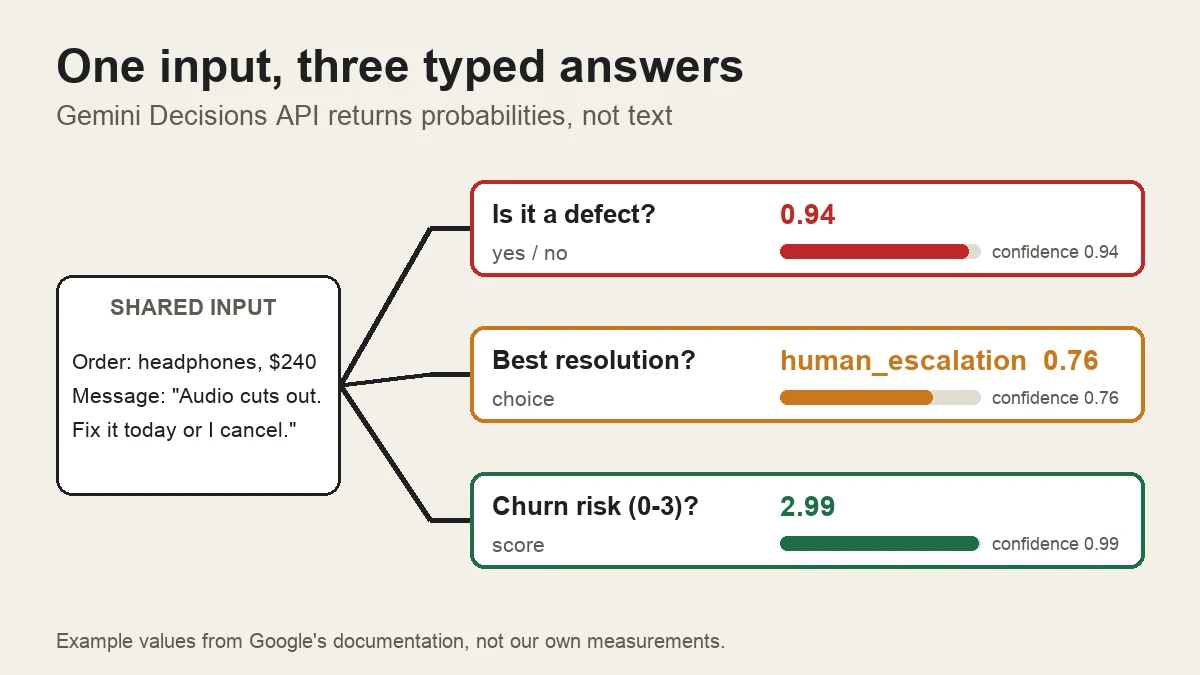
On 11 November 2026 Google released a model that writes nothing. The Gemini Decisions API takes an input, asks it a list of fixed questions, and returns numbers: how likely is this a yes, which of these options fits, how severe is it on a scale of 0 to 3.
It is the fastest-rising term next to "API" in Google Trends this week, and it is a real change in how software can use a language model. This guide explains what it is, what it costs, where it stops working, and how it differs from OpenAI's version. Everything below comes from Google's launch post and developer documentation, OpenAI's documentation and outside write-ups, read on 12 November 2026. We have not called the API ourselves; the "What we did not test" section says exactly what that means.
What is the Gemini Decisions API?#
A normal language model answers by writing. That is slow and costly when all your code wants is a branch: is this message about billing, is this photo damaged, should this agent call a tool. You ask for one word, get back "Billing." with a full stop, and write a parser and a retry.
The Decisions API removes that step. Per Google's documentation, you send shared input and a map of questions, and get one typed answer per question. The model "generates zero text tokens, so output token usage is always 0," so your code can branch on the response directly.
There are three question types:
| Type | What it asks | What comes back |
|---|---|---|
Yes/no (noul) | Does this statement hold? | A probability from 0.01 to 0.99, plus confidence |
Choice (choice) | Which of 2 to 255 options fits? | The winner, a probability for every option, plus confidence |
Score (score) | Where does this land on an ordered rubric of 2 to 255 levels? | A weighted score, a probability per level, a legend, plus confidence |
Confidence is the estimated probability that the top answer is right. Your code can act on a high-confidence answer and send a low-confidence one to a person.
Google says the model works by scoring your options in one forward pass instead of writing an answer token by token. That is why output is free and why, per Google, latency stays nearly flat as you add questions.
What can one request contain?#
Here are the limits, as stated in Google's documentation and model page:
| Limit | Value |
|---|---|
| Questions per request | 1 to 1,000 |
| Options in a choice question | 2 to 255 |
| Levels in a score question | 2 to 255 (2 to 10 recommended) |
| Context window | 262,144 tokens, shared by the input and every question |
| Input types | Text, image, audio, video, PDF |
| Inline upload | Up to 100 MB per request (50 MB for PDFs) |
| URL input | Up to 15 MB per external URL |
| Media inside questions | Not supported, questions are text only |
You can combine media in one input. Google's own examples are "a call recording with account metadata" and "a scanned PDF claim with damage photos." Image and video blocks have a resolution setting (low, medium, high, and ultra-high for images) so you can trade detail for tokens. Questions cannot see each other, so adding or removing one never changes the others.
Here is Google's own quickstart from the model page. We have not run it (see the last section):
from google import genai

client = genai.Client(http_options={"api_version": "v1beta"})

result = client.decisions.create(
    model="gemini-decision-1",
    input="The blue mug I ordered on Monday arrived cracked on Wednesday.",
    questions={
        "is_damaged": {
            "type": "noul",
            "instructions": "Did the item arrive damaged?",
        },
        "queue": {
            "type": "choice",
            "instructions": "Which support queue should handle this message?",
            "criteria": {
                "billing": "Payment, invoice, or refund questions.",
                "replacements": "Damaged, missing, or wrong items.",
                "general": "Product questions and account updates.",
            },
        },
    },
)

damaged = result.answers["is_damaged"]
queue = result.answers["queue"]
print(f"P(damaged)={damaged.noul:.2f} queue={queue.choice}")
It needs the google-genai SDK version 3.2 or later. You can also send a plain POST request to the v1beta/decisions endpoint with an API key, as shown in Flavio Copes's walkthrough of the docs.
How much does the Gemini Decisions API cost?#
Google lists $0.10 per million input tokens and $0 for output. Two billing rules matter more than the rate:
- Shared input is billed once per request, however many questions you ask. Each question adds only its own instructions and criteria tokens.
- Nothing is discounted. The documentation states that context caching, Batch API and Flex or Priority inference are not supported, so "repeated input across requests counts in full."
Google's documentation gives a support-ticket example that used 324 input tokens and 0 output tokens for three answers. We can turn that into a rough monthly bill (our arithmetic, at the list price):
| Workload | Calculation | Cost |
|---|---|---|
| 1 request like Google's ticket example | 324 tokens x $0.10 per 1M | about $0.0000324 |
| 1 million such requests a month | 324M tokens x $0.10 per 1M | $32.40 |
| 4,000-token record, 20 checks of 50 tokens | one request: 5,000 tokens | $0.50 per 1,000 records |
| Same checks as 20 separate calls | 20 x 4,050 tokens | $8.10 per 1,000 records |
The last two rows show why the shared-input design matters more than the headline rate: asking twenty questions in one request is about sixteen times cheaper than sending the record twenty times.
For comparison, Google's own launch post says the Decisions API is "nearly 5x cheaper" than Gemini 3.5 Flash-Lite with the Interactions API on its benchmark suite. That is a vendor claim. As a sanity check, OpenRouter lists Flash-Lite at $0.30 per million input and $2.50 per million output. If the same 324-token request also produced 40 tokens of JSON (our assumption), that route would cost about $197 per million requests, against $32.40 here, before any thinking tokens.
What are the free-tier limits?#
Google AI Studio has a free tier for prototyping. Two independent write-ups (Flavio Copes and Apidog) list it as 200 requests per minute, 50,000 tokens per minute and 10,000 requests per day. With requests the size of Google's 324-token example, the token limit binds first: 50,000 / 324 is about 154 requests a minute, not 200. On the free tier, Google may also use your data to improve its products; the paid tier does not.
How does it compare with the OpenAI Decisions API?#
OpenAI got there first. Its Decisions API became generally available on 22 October 2026 with the model gpt-6-luna, and charges the same $0.10 per million uncached input tokens with no output charge. The two share the same idea and the same three question shapes. They differ in the details:
| Gemini Decisions API | OpenAI Decisions API | |
|---|---|---|
| Model | gemini-decision-1 | gpt-6-luna |
| Status | v1beta | Generally available |
| Questions per request | Up to 1,000 | Up to 400 |
| Inputs | Text, images, audio, video, PDF | Text, images, JSON, conversation and tool-call history |
| Images inside questions | No | Yes |
| Prompt caching | Not supported | Supported |
| Input price per 1M tokens | $0.10 | $0.10 (more above long-context thresholds) |
| Output price | $0 | $0 |
| Free tier | Yes, in Google AI Studio | Not documented for this endpoint |
| Zero data retention / HIPAA | Not documented | Supported for eligible customers |
Sources: Google's Decisions API documentation and OpenAI's Decisions guide, with Apidog's side-by-side as a cross-check.
The practical split:
- Pick Gemini when your evidence is audio, video or a scanned PDF, when you need more than 400 questions on one input, or when you want to prototype for free.
- Pick OpenAI when you need a generally available endpoint, when you reuse a big shared input (caching), when your evidence is agent history or JSON, or when you need data-retention or HIPAA terms.
Caching can change the bill a lot. Take the example Apidog uses: a 10,000-token policy document with 20 questions of 50 tokens each, one million times a month. At Gemini's list price that is 11 billion tokens, or $1,100. On OpenAI with every shared token a cache hit at $0.01 per million, it is about $200 plus cache writes (our arithmetic from the published rates). If each request carries fresh input, such as a new ticket or photo, caching cannot help and the per-token cost is the same.
The request shapes also differ. Gemini takes a map keyed by your own question IDs and calls the yes/no type noul. OpenAI takes an array, calls it predicate, and echoes a name you give each question. Switching between them means a small adapter, not a find-and-replace.
Where does it stop working?#
The documentation is unusually direct about this. The rules most likely to trip you up:
- Choice always spreads probability across your options, even when none fits. Check confidence, add an "other" option, or pair it with a yes/no scope check such as "Is this message about an order?"
- Option keys are sorted alphabetically before scoring. A catch-all called
none_of_the_abovelands ahead ofshipping. Name itother. - The model never sees your question keys. Put the full question in
instructions. - Yes/no probabilities stay between 0.01 and 0.99. A threshold of "above 0.99" never matches.
- Do the maths in your code. Compare dates, amounts and durations yourself, then pass the result in.
- Input is untrusted. User text can "argue for its own classification." Write explicit criteria, test with adversarial examples, and keep a human or second check on payouts and refunds.
- Safety filters return an HTTP 400 for the whole request, with a code such as
safetyorprohibited_content, rather than an answer for each question. - No generation of any kind. The model page lists text generation, thinking, function calling, structured outputs and search grounding as not supported.
Scores need care too. The score is the probability-weighted average of the level numbers (0, 1, 2 and so on), so it can land between levels, and different distributions can give the same average. Google's example of 1.12 sits just above level 1. Look at the per-level probabilities and the confidence, and keep your scale evenly spaced: levels meaning 1, 10, 100 and 1,000 would skew the average.
When should you use a decision API instead of a chat model?#
Use one when the answer space is closed and the question is asked often. Google lists these jobs: routing a request to a model, queue, agent or tool; checking inputs and outputs against many rules at once; deciding which tools an agent needs or whether to stop; and filtering or ranking candidates against a rubric.
Google also says its own teams use it. Gemini Notebook uses it as a router for model tier and thinking level (Google reports up to 40% lower latency on everyday queries), and Google Search uses it as a safety layer for MCP tools. Those are Google's statements, not something we checked.
| If you need... | Use |
|---|---|
| A yes/no, a pick-one, or a rating you can threshold | Decisions API |
| Many independent checks on the same input | Decisions API (one request) |
| An extracted name, date or summary | A normal model with structured output |
| An explanation of why | A normal model |
| A tool call with arguments | A normal model with function calling |
The two also combine well: ask the decision model whether a message needs a reply at all, and call the larger, slower model only when it does. If you are choosing between model providers for that second step, our Claude API guide and OpenAI API guide cover current prices and limits, and API design principles covers how to wrap either one behind a stable interface of your own.
Should you use it now?#
Try it if you already write code around LLM calls that return one word, or if your evidence is audio, images or PDFs and you would like to skip transcription and OCR. A free tier and $0.10 per million tokens make a proof of concept nearly free.
Hold back if you need a generally available endpoint, caching, a batch mode, Google Cloud support or data-retention guarantees, because Gemini's endpoint has none of those today. Whichever you pick, measure on your own labelled data. Google's claims that the model "leads across the suite, with the lowest calibration error" are its own benchmark results, and Google's latency figures cover inputs up to 16K tokens, not the full 262,144-token window. Set your confidence thresholds from your own traffic, weighing the cost of a wrong yes against a wrong no.
If you build or sell APIs of your own, this launch is also a pattern worth copying: small, typed, single-purpose endpoints with a confidence value are easier for other developers to use than free text. We explain the general idea in backend primitives for AI engineers.
What we did not test#
We have not called the Gemini Decisions API. It needs an API key from Google AI Studio, and Google's Decisions Playground was not available to us. So:
- Every request, response and number in this guide comes from Google's and OpenAI's documentation or from the outside write-ups listed below. The Python sample above is copied from Google's model page and has not been run by us.
- The latency, accuracy and calibration claims are Google's. We have not measured them, and nobody we read has published an independent benchmark yet.
- The cost table is our arithmetic from published list prices, not a bill. The Flash-Lite comparison assumes 40 output tokens per request, which is our guess.
- We did not test OpenAI's endpoint either.
- The free-tier limits come from two write-ups, not from Google's rate-limit table, which we could not read in full.
Sources#
- Google, Gemini Decisions API: Fast, calibrated multimodal decisions (launch post, 11 November 2026)
- Google AI Studio, Decisions API documentation
- Google AI Studio, Gemini Decision model page
- Google AI Studio, pricing and rate limits pages
- OpenAI, Decisions guide
- Apidog, Gemini Decisions API vs OpenAI Decisions API
- Flavio Copes, How to use the Gemini Decisions API
- eesel AI, Gemini Decisions API: how it works, pricing and comparison
- Unite.AI, Google Launches Gemini Decisions API for Multimodal AI Workflows
- AIERA Blog, Gemini Decisions API Explained
- DEV Community, Google launches Decisions API for fast routing and scoring
- OpenRouter, Gemini Decision 1 model page
- Google Trends, "api" in the United States, past 7 days (rising related queries)