Most API design advice is a list of rules. This one is a list of mistakes we reproduced: we built a small server for each one, ran it, and wrote down what broke.
Our API design principles guide covers the rules in 12 short sections. This post is the other half: what happens in numbers when you skip one. Every number below comes from a test we ran on 18 November 2026 on a laptop, with the code kept small enough to read.
How we tested#
Each test is a short Node.js or Python script with an in-memory server or a local database. They are small on purpose, so they show one behaviour clearly. They are not benchmarks of your production system, and your numbers will differ. What carries over is the shape of the failure.
Where a standard defines the right behaviour, we link to it: RFC 9110 for HTTP methods and status codes, RFC 6585 for 429, and RFC 9457 for error bodies.
The 12 mistakes at a glance#
| # | Mistake | What we measured | Fix |
|---|---|---|---|
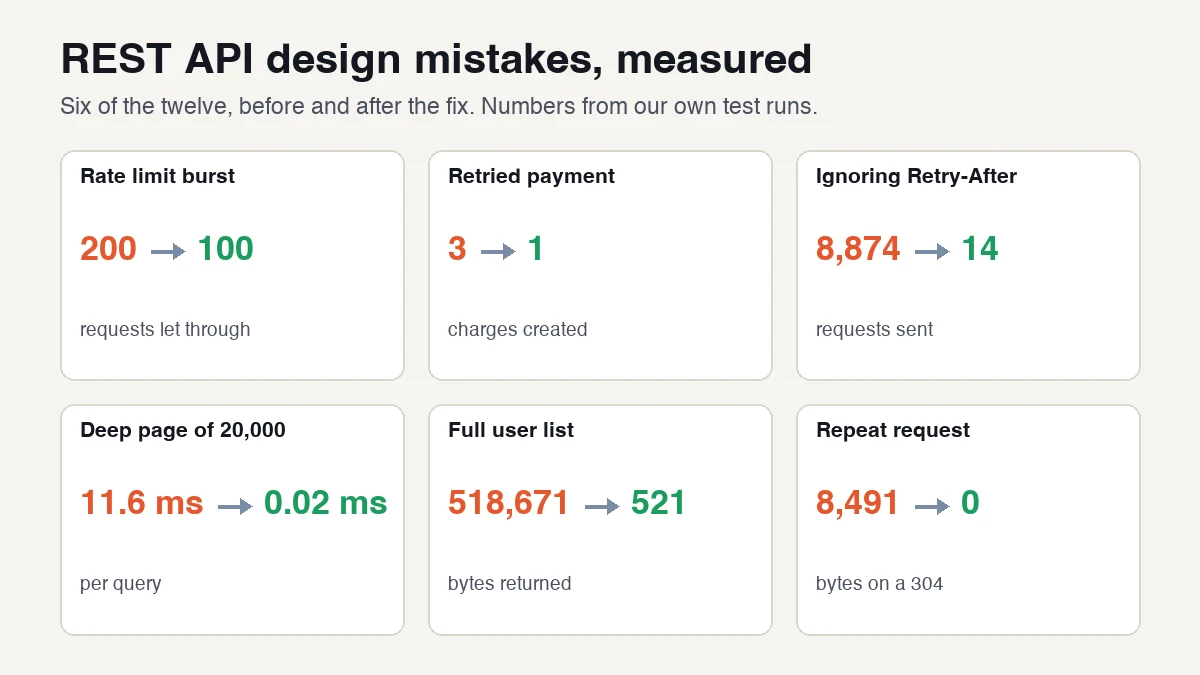
| 1 | Fixed-window rate limit | 200 requests let through in 0.2 s, limit was 100 | Sliding window or token bucket |
| 2 | Retry with no idempotency key | 3 charges for 1 order | Idempotency key |
| 3 | No Retry-After on 429 | 8,874 requests vs 14 | Send Retry-After |
| 4 | HTTP 200 for errors | 0% error rate on the dashboard, 5% real | Real status codes |
| 5 | 403 for other people's objects | Caller can tell real from missing | 404 plus an ownership check |
| 6 | Offset pagination | 11.64 ms vs 0.02 ms | Keyset cursor |
| 7 | Cursor on a timestamp only | 119 of the first 200 rows skipped | Add the ID as a tie-breaker |
| 8 | Returning every field of every row | 518,671 B vs 521 B | Limits and field selection |
| 9 | Big IDs as JSON numbers | 1234567890123456789 became 1234567890123456800 | IDs as strings |
| 10 | Dates with no timezone | 04:30 UTC vs 18:00 UTC | Always send an offset or Z |
| 11 | Renaming a field in place | charge user undefined | Add the new field, keep the old one |
| 12 | No ETag on big responses | 8,491 B on every repeat vs 0 B | ETag and 304 |
1. A fixed-window rate limiter lets through double the limit#
A fixed window counts requests in clock-aligned minutes. A client can send 100 requests at the end of one minute and 100 more at the start of the next. We set a limit of 100 a minute and sent a burst across the boundary:
fixed   allowed in 0.2s straddling the boundary: 200 (first burst 100)
sliding allowed in 0.2s straddling the boundary: 100 (first burst 100)
bucket  allowed in 0.2s straddling the boundary: 100 (first burst 100)
Fix: use a sliding window or a token bucket. Both held the limit at 100.
2. A retry with no idempotency key charges the customer again#
A client sends a payment and the connection times out. The client cannot know whether the server saw it, so it retries. With no key, the server treats each try as new:
no key:   charges created = 3
with key: charges created = 1
Fix: accept an idempotency key, store the first result under it, and return that result on repeats. Stripe's documentation describes this pattern and says its keys can be removed after at least 24 hours.
3. A 429 without Retry-After makes clients hammer you#
A server allowed 5 requests a second and a client needed 12 calls. We tried three client behaviours against it:
naive        server saw 8874 requests, 8862 were 429s
sleep 50ms   server saw 52 requests, 40 were 429s
Retry-After  server saw 14 requests, 2 were 429s
The naive count changes from run to run, but it is always in the thousands. Fix: return the 429 status from RFC 6585 together with a Retry-After header, and say in your docs that clients should honour it.
4. Returning HTTP 200 with an error inside hides your failures#
We served 1,000 requests where 50 failed. With real status codes, the usual dashboard that counts 5xx responses showed a 5% error rate. When the same failures came back as 200 with {"error": ...} in the body, it showed 0%.
proper status codes -> dashboard 5xx rate: 5%
always-200 style    -> dashboard 5xx rate: 0%  (real failures: 50/1000)
Fix: use the status code that matches the outcome, and put details in a standard body such as RFC 9457 problem details.
5. A 403 tells a stranger that the object exists#
We built three versions of GET /orders/{id}, logged in as Alice. Order 1 is hers, order 2 is Bob's, order 999 does not exist.
vulnerable: Bob's order 2 -> 200 {"id":2,"owner":"bob","total":99}
design A:   Bob's order 2 -> 403, missing 999 -> 404   (Alice can tell them apart)
design B:   Bob's order 2 -> 404, missing 999 -> 404   (no difference)
The first version is the real bug: no ownership check at all, which OWASP lists as Broken Object Level Authorization, the first item in its 2023 API Top 10. Design A fixes that but lets Alice count other customers' orders by trying IDs. Fix: check ownership on every request, and return 404 for both cases when the existence of the object is itself private.
6. Offset pagination slows down the deeper you go#
We filled a table with 500,000 rows and asked for 20 rows at a time, sorted by date:
offset page 1      0.02 ms
offset page 20000  11.64 ms
keyset deep page   0.02 ms
The database still has to walk past every skipped row. A keyset query ("rows after this one") goes straight to the spot through the index. Fix: return a next cursor built from the last row's sort key.
7. A cursor on a timestamp alone skips rows#
In the same table, 50 rows share each timestamp. We paged by "created after the last timestamp I saw":
created-only cursor: got 200 rows, only 81 of the first 200 seenThe next page started after the whole timestamp, so up to 50 rows were skipped each time. In this test, 119 of the first 200 rows never appeared. Fix: sort by the timestamp and the ID, and put both in the cursor. Our keyset query used (created, id) > (?, ?).
8. Returning every field of every row is slow and costly#
A list endpoint of 1,000 users returned everything by default:
all 1000 users, all fields : 518671 bytes
first 20 users, all fields :  10291 bytes
first 20, fields=id,name    :    521 bytes
Two separate fixes stack: a default page size (a 98% cut here) and field selection on top (a further 95%). Separately, compression helps: a 24,957-byte JSON response (compact) came to 3,549 bytes with gzip level 6, about 14% of the size. Gzip level 9 saved only 97 bytes more and took more than twice the CPU time.
9. Big numeric IDs change when JavaScript reads them#
server sends id      : 1234567890123456789
JS JSON.parse reads  : 1234567890123456800
two different ids collide? true
as string it survives: true
JavaScript numbers are exact only up to 9,007,199,254,740,991, as MDN documents. Past that, two different IDs can turn into the same number. Fix: send IDs as strings, even when they look numeric.
10. A date with no timezone means different times on different machines#
We parsed the same strings on a machine set to India time (UTC+5:30):
2026-11-17T10:00:00Z         -> 2026-11-17T10:00:00.000Z
2026-11-17T10:00:00+05:30    -> 2026-11-17T04:30:00.000Z
2026-11-17T10:00:00          -> 2026-11-17T04:30:00.000Z
2026-11-17                   -> 2026-11-17T00:00:00.000Z
The third string has no zone, so it was read as local time: 04:30 UTC on this machine, but 18:00 UTC on a machine set to Los Angeles time. Fix: always send an offset or Z, and say in your docs that timestamps are UTC.
11. Renaming a field in place breaks every client#
A client read userId from the response. After the server renamed it to customerId:
v1                             -> charge user 7
rename userId->customerId      -> charge user undefined
additive (keep old, add new)   -> charge user 7
Nothing errored. The client simply charged a user called undefined. Fix: treat additions as safe and renames and removals as breaking. Add the new field, keep the old one, and remove it only in a new version with notice.
12. Sending the same big response again and again#
The first request returned 8,491 bytes. With an ETag, the repeat request returned a 304 Not Modified with no body:
first request : 200 body bytes 8491
repeat w/ ETag: 304 body bytes 0
RFC 9110 defines the conditional request flow behind this. Fix: send an ETag on large, stable responses and honour If-None-Match.
A bonus mistake: PUT that behaves like PATCH#
A user had an id, name, email and phone. We changed only the email:
PUT   {email} -> {"id":1,"email":"[email protected]"}
PATCH {email} -> {"id":1,"name":"Asha","email":"[email protected]","phone":"555"}
RFC 9110 describes PUT as creating or replacing the state of the target resource, so the fields we left out were gone. If your clients send partial updates, document PATCH for that, and make sure PUT does not silently half-work.
Which to fix first#
- Anything that leaks data or loses money: #5 (ownership checks) and #2 (idempotency keys).
- Anything that hides problems: #4 (honest status codes) and #3 (
Retry-After). - Anything that corrupts data quietly: #7 (cursors), #9 (big IDs) and #10 (dates).
- Anything that grows with traffic: #6 (offset paging), #8 (list size) and #12 (caching).
- Anything that breaks customers on release day: #11 (renames).
What we did not test#
- We ran each test on a laptop with small scripts. We did not run a load test or measure a production system.
- The pagination timings use SQLite with 500,000 rows. A different database will give different numbers, but the same shape.
- The rate-limit tests use a simulated clock, not live traffic.
- We did not test CORS, webhook signature checks, or authentication flows in this post.
Quick checklist#
- Every object read checks that the caller owns it
- Payments and other writes accept an idempotency key
- Errors use real status codes and a standard error body
- 429 responses include
Retry-After - Lists are paginated with a keyset cursor that includes an ID
- IDs are strings and timestamps carry a timezone
- Renames are done by adding a field, not changing one
- Large stable responses send an
ETag
Related reading#
- API Design Principles: 12 Rules for a Great API: the rules these mistakes break.
- What Is a REST API?: the basics, in plain English.
- REST API vs SOAP API: when each one fits.
- API request methods: GET, POST, PUT, PATCH, DELETE: what each method should do.