You have a photo of a shipping label. At the bottom is a barcode, and you need the batch number, the expiry date and the product number out of it, as data, not as a long string of digits.
That barcode is probably GS1-128. It is everywhere on pallet labels, carton labels and pharmacy and food supply chains. Reading it sounds like a job for any barcode scanner API, but this is where people get stuck. Many tools read the bars fine and then hand you one unstructured string.
We looked at eight ways to read GS1-128 from an image, checked their official pages, and ran one of them on real GS1-128 labels we generated. This guide explains the format in plain language, compares the options, and tells you which to pick for your situation.
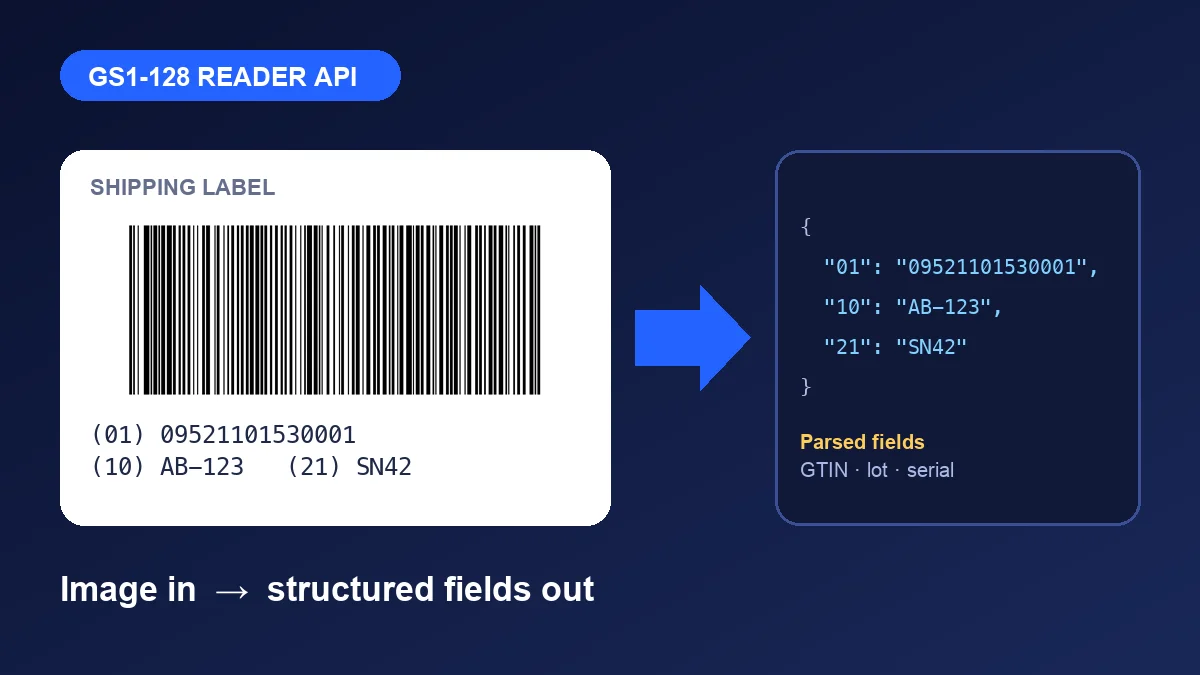
What is GS1-128, in plain language?#
Code 128 is a common barcode that can hold letters and numbers. GS1-128 is Code 128 with a rule book on top. The rule book says the data is a series of fields, and every field starts with a short number called an Application Identifier (AI) that says what it is.
A few you will meet all the time:
| AI | Meaning | Length |
|---|---|---|
00 | SSCC (pallet or carton ID) | Fixed, 18 digits |
01 | GTIN (product number) | Fixed, 14 digits |
10 | Batch or lot | Variable, up to 20 characters |
17 | Expiry date, as YYMMDD | Fixed, 6 digits |
21 | Serial number | Variable, up to 20 characters |
So this label text:
(01)09521101530001(17)210119(10)AB-123means: product 09521101530001, expires 19 January 2021, batch AB-123.
Two details trip people up:
- The brackets are not in the barcode. They are only there so humans can read the label. The scanner gets
01095211015300011721011910AB-123. - Variable-length fields need a separator. The reader cannot guess where a batch number ends, so a special marker sits between a variable field and the next one. In the data you receive, it shows up as the character with code 29 (hex
1D). No separator is needed after the last field.
The start of the barcode also carries a hidden marker called FNC1. That marker is what makes it GS1-128 instead of plain Code 128. Readers report it with a prefix: ]C1 for GS1-128 and ]C0 for plain Code 128.
What a good GS1-128 reader API must do#
When you compare tools, ask these five questions. A tool that says "supports Code 128" has only answered the first.
- Does it read the bars from an image? Photos, scans and PDFs are different inputs.
- Does it tell you the code is GS1? Look for the
]C1prefix or a GS1 flag. - Does it keep the separator? Without the
1Dcharacter you cannot split variable fields. - Does it parse the fields? Named AIs with values save you writing your own parser.
- Where does it run? A cloud API, a server library or an on-device mobile SDK each suit different jobs.
The 8 options compared#
Prices and limits below were checked on 22 October 2026 from each vendor's own pages where we could. "Not confirmed" means we could not find it stated, which is not the same as "not supported". Test with your own labels before you buy.
| Option | Type | Reads image | GS1-128 fields parsed for you | Free or trial | Price |
|---|---|---|---|---|---|
| ZXing-C++ | Open-source library | Yes | No, but flags GS1 and keeps the separator (we tested) | Free forever | Free (Apache-2.0) |
| Dynamsoft Barcode Reader | Server and web SDK | Yes | Yes, built-in GS1 AI parser | 30-day trial, no card | From $1,499 a year |
| Scandit | Mobile and web SDK | Yes | Not confirmed | 30-day trial | Contact sales |
| Scanbot SDK | On-device SDK | Yes | Not confirmed | Trial licence | Flat annual fee, quote |
| Cloudmersive Barcode API | Hosted REST API | Yes | Not confirmed | 600 free calls a month | Contact sales |
| PDF.co Barcode Reader | Hosted REST API | Yes, plus PDFs | Not confirmed | Free sign-up | Not stated |
| Aspose.BarCode Cloud | Hosted REST API | Yes | Not confirmed | Free trial account | See Aspose pricing |
| Google ML Kit | On-device library | Yes | Not confirmed | Free | Free |
Two other tools came up that are not readers. They only parse a string you already have, so they pair with any reader above:
- Zebra GS1 Barcode Decoder API turns a GS1 string into readable JSON. It needs an API key. The page does not state pricing.
- OCA Odoo GS1 module is an open-source parser, useful if you already run Odoo.
1. ZXing-C++: best free option#
ZXing-C++ is the open-source barcode library behind a lot of other products. It is licensed under Apache-2.0, supports Code 128, GS1 DataBar and Data Matrix, and has wrappers for Python, .NET, Rust, Go, Android, iOS and WebAssembly.
Because it is a library, you host it yourself. That is a plus for privacy and cost, and a minus if you wanted a ready-made URL to call.
We tested it ourselves, and the result is the most useful part of this guide. We generated two real GS1-128 labels (with the FNC1 marker) and read them with ZXing-C++ 3.1.1 for Python. Both were read correctly, flagged as GS1, and the separator was kept. See the code below.
2. Dynamsoft: best paid server tool with built-in parsing#
Dynamsoft Barcode Reader is a commercial SDK for server, desktop and web. Its documentation shows a built-in GS1 AI parser: you load a template, the reader decodes the barcode, and a second step splits it into named fields such as GTIN, expiry and net weight.
Pricing starts at $1,499 a year, with usage-based or flat annual plans, and quotes depend on scan volume and deployment. There is a 30-day free trial with no card needed. One honest caveat: the guide we read demonstrates a GS1 DataBar label, not GS1-128 specifically, so run your own GS1-128 sample in the trial. It is a local SDK, and we found no hosted REST option on its pricing page.
3. Scandit: for demanding mobile and warehouse scanning#
Scandit is aimed at enterprise mobile scanning. We found no public SDK price: it offers fixed and usage-based plans and a 30-day trial, and you contact sales for a quote. We could not confirm its GS1 parsing from the pages we could read. It tends to suit large rollouts where scan speed on handhelds matters more than cost.
4. Scanbot SDK: flat fee, on-device#
Scanbot has a dedicated GS1-128 page. It works 100% on-device, runs on Android, iOS, web, Windows and Linux, and charges a flat annual fee with no limit on scans. The price depends on how many apps or web domains you use it in. The company was acquired by Apryse, so check current terms.
5. Cloudmersive: simple hosted API with a free tier#
Cloudmersive's Barcode API scans a photo of a barcode and returns the result. Its page lists 600 free calls a month with no expiration (one third-party directory says 800, so confirm when you sign up), and the free calls are shared across its APIs. Paid prices are not published.
Its scan options include CODE_128 and the GS1 DataBar types (RSS_14, RSS_EXPANDED), according to Microsoft's connector documentation. We found nothing that says it returns GS1-128 fields, so treat it as an image-to-string step.
6. PDF.co: when your input is a PDF#
PDF.co's Barcode Reader API reads JPG, PNG, TIFF and PDF files, and it has an asynchronous mode for jobs longer than 25 seconds. That makes it a fit for scanned delivery notes. GS1 is not mentioned on the page, and pricing is behind sign-up.
7. Aspose.BarCode Cloud: part of a document toolkit#
Aspose.BarCode Cloud is a REST API for generating and recognising barcodes. A free trial account is available, but the quota figures we found conflicted, so check the trial page directly. It is a sensible pick if you already use other Aspose document tools.
8. Google ML Kit: free for Android and iOS apps#
ML Kit barcode scanning runs fully on the device, free, and supports Code 128 and Data Matrix among others. We could not confirm GS1 field parsing in its docs, so expect to parse the string yourself.
Which should you pick?#
- You want to try this today, for free: ZXing-C++, plus the small parser below.
- You are building a warehouse mobile app: start with ML Kit for a free prototype. Compare Scandit and Scanbot trials if scan speed on bad labels becomes the problem.
- You process images on a server and want parsed fields: Dynamsoft, after running your own GS1-128 samples in the 30-day trial.
- You only want a hosted URL to call: Cloudmersive's free tier or PDF.co for PDFs, with your own parser (or Zebra's decoder) behind it.
- You already run Odoo: its GS1 module handles parsing.
Try it: read a GS1-128 image in Python#
This is the test we ran. It needs pip install zxing-cpp pillow numpy.
import zxingcpp
from PIL import Image

img = Image.open("label.png")
for code in zxingcpp.read_barcodes(img):
    if code.symbology_identifier == "]C1":   # GS1-128 (plain Code 128 is ]C0)
        print("GS1-128 element string:", code.text)
        print("Raw bytes:", code.bytes)
    else:
        print("Plain barcode:", code.text)
Output on our test label, where batch and serial are both variable-length:
GS1-128 element string: (01)09521101530001(10)AB-123(21)SN42
Raw bytes: b'010952110153000110AB-123\x1d21SN42'
Notice the \x1d between the batch and the serial. That is the separator. Because it survived, we can split the fields with a small parser:
FIXED = {"00": 18, "01": 14, "02": 14, "11": 6, "13": 6, "15": 6, "17": 6}
VARIABLE = {"10", "21", "30", "37"}

def parse(raw: str) -> dict:
    out, i = {}, 0
    while i < len(raw):
        ai = raw[i:i + 2]
        i += 2
        if ai in FIXED:
            out[ai] = raw[i:i + FIXED[ai]]
            i += FIXED[ai]
        elif ai in VARIABLE:
            end = raw.find("\x1d", i)
            end = len(raw) if end == -1 else end
            out[ai] = raw[i:end]
            i = end + 1
        else:
            raise ValueError(f"AI {ai} is not in this small table")
    return out

print(parse(raw_bytes.decode("ascii")))
# {'01': '09521101530001', '10': 'AB-123', '21': 'SN42'}
On our second label ((01)…(17)210119(10)AB-123) it returned {'01': '09521101530001', '17': '210119', '10': 'AB-123'}.
Common mistakes with GS1-128#
- Treating the brackets as data. They are not in the barcode. Add them back only for display.
- Losing the separator. Some readers drop the
1Dcharacter. Then a lot number and serial number run together and cannot be split. Always test a label with two variable-length fields. - Decoding as UTF-8. The separator is a control character. Decode as ASCII or Latin-1 so a stray byte does not crash you.
- Not checking the prefix.
]C1means GS1-128,]C0means plain Code 128. If you ignore it, you will try to parse internal bin labels as GS1 data. - Assuming one barcode per image. Labels often carry several. Make sure your tool returns all of them.
- Testing only with clean images. Real labels are curved, glossy, wrinkled and photographed at an angle. Test with ugly samples.
Quick checklist before you choose#
- I tested the tool with a real label that has two variable-length fields
- The result shows the
]C1prefix or a GS1 flag - The separator (hex
1D) survives in the output - I know whether the tool parses fields or only returns a string
- I checked the free limit against my expected monthly volume
- I know where images go (cloud API or on-device) and that this is acceptable for my data
Related reading#
- API Design Principles: what to look for in any API before you depend on it.
- What Is a REST API?: the basics behind the hosted options above.
- Why API Tutorials Go Out of Date: another reason to confirm prices and limits yourself.