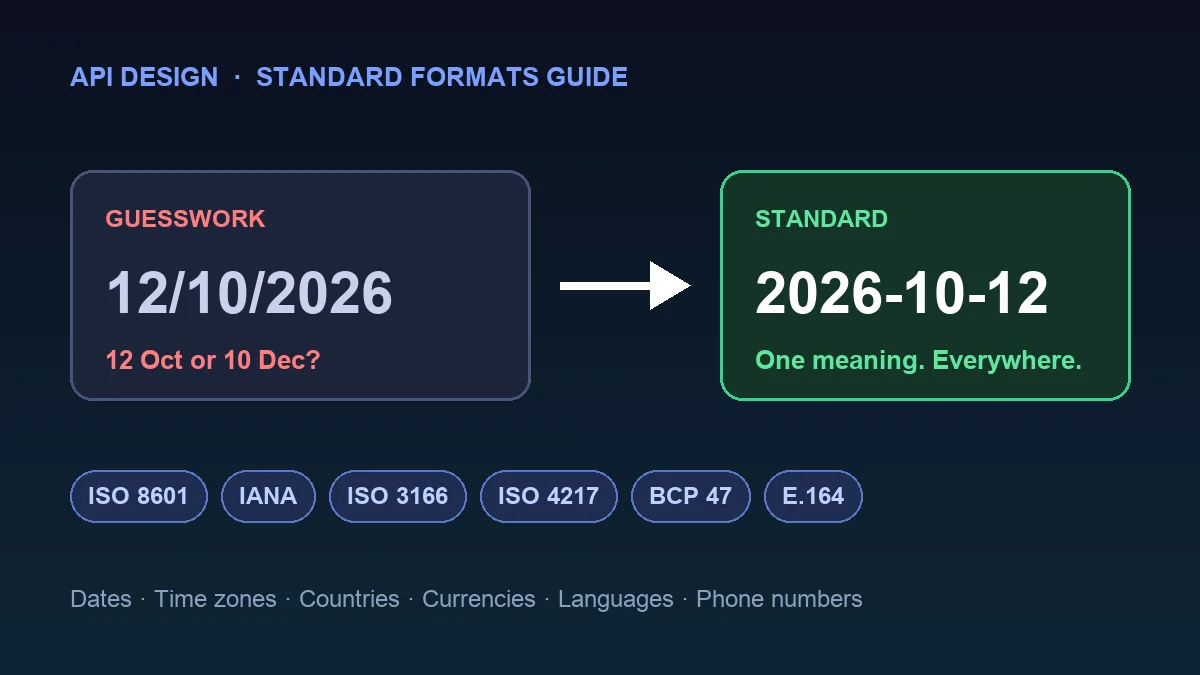
Two systems talk to each other. One sends the date 12/10/2026. The other reads it as 10 December. The sender meant 12 October. Nobody sees an error, and a customer gets the wrong invoice date.
This is the most common quiet bug in APIs, and it has an easy fix: use the international standard format for each kind of data. Dates, time zones, countries, currencies, languages and phone numbers all have one. This guide shows all six, with examples you can copy and the mistakes that cause real bugs.
The cheat sheet#
| What you send | Standard | Good example | Common mistake |
|---|---|---|---|
| Date and time | ISO 8601 / RFC 3339 | 2026-10-19T09:30:00Z | 10/19/26 or 19-10-2026 |
| Time zone | IANA time zone name | Asia/Kolkata | IST or +05:30 |
| Country | ISO 3166-1 alpha-2 | GB | UK, England, Britain |
| Currency | ISO 4217 | INR | Rs, $, dollars |
| Language | BCP 47 | en-US | English, en_US |
| Phone number | E.164 | +14155552671 | (415) 555-2671 |
The rest of the post explains each row in plain language. If you are still deciding how your API should look overall, read API Design Principles: 12 Rules for a Great API next.
1. Dates and times: ISO 8601 and RFC 3339#
The format: year, month, day, then a capital T, then hours, minutes, seconds and a time zone marker.
2026-10-19                   a date
2026-10-19T09:30:00Z         a moment in time, in UTC
2026-10-19T15:00:00+05:30    the same kind of moment, with an offset
The Z means UTC. An offset such as +05:30 means "local time minus UTC". RFC 3339 gives the example 1996-12-19T16:39:57-08:00, which is the same moment as 1996-12-20T00:39:57Z.
Why it wins: it puts the biggest unit first, so a list of dates sorts correctly even as plain text. It also has no regional meaning, which fixes the 12/10 problem above.
ISO 8601 or RFC 3339? They are not rivals. RFC 3339 is a profile of ISO 8601 for internet use, a strict subset of its extended format. ISO 8601 allows many styles, and RFC 3339 chooses one that is easy for software to parse. For APIs, follow RFC 3339.
Here is how to create and read one in Python:
from datetime import datetime, timezone

now = datetime.now(timezone.utc)
print(now.isoformat(timespec="seconds"))      # 2026-10-19T09:30:00+00:00

parsed = datetime.fromisoformat("2026-10-19T09:30:00+00:00")
print(parsed.year, parsed.month, parsed.day)  # 2026 10 19
And in JavaScript:
const now = new Date();
console.log(now.toISOString());               // 2026-10-19T09:30:00.123Z

const parsed = new Date("2026-10-19T09:30:00Z");
console.log(parsed.getUTCFullYear());         // 2026
Mistakes to avoid
- Sending a time with no zone, like
2026-10-19T09:30:00. The reader has to guess where it happened. - Mixing styles:
2026-10-19in one endpoint and19/10/2026in another. - Using a Unix timestamp (a plain number of seconds) in a field people read. It works for software, but nobody can read it in a log.
2. Time zones: use the IANA name, not an offset#
An offset like +05:30 says how far a moment is from UTC. It does not say which place you mean, and that matters the moment the clocks change.
The standard for naming places is the IANA time zone database. Names look like Asia/Kolkata, Europe/London and America/New_York. Each name carries its own history of daylight saving rules, so software can work out the right offset for any date.
{
  "event": "Team call",
  "starts_at": "2026-10-19T09:30:00Z",
  "time_zone": "Europe/London"
}
A simple rule: store the exact moment in UTC, and store the IANA zone name next to it if people need to see local time. For a future meeting, keep the local time plus the zone name, because rules about clock changes can change before the date arrives.
Mistakes to avoid
- Three-letter abbreviations such as
IST. That one alone can mean India, Ireland or Israel. - Using an offset where you mean a place.
+01:00in January and+01:00in July might not be the same city. - Old alias names. The database keeps old names such as
Asia/Calcuttaas links so existing data still works, but new data should use the current name,Asia/Kolkata.
3. Countries: ISO 3166-1 alpha-2#
The format: two capital letters. IN is India, US is the United States, DE is Germany.
The ISO 3166-1 list has 249 officially assigned codes. Each country also has a three-letter code (IND, USA, DEU) and a three-digit number. For most APIs, the two-letter code is the one to pick. It is short, widely supported and works in other standards too: the same two letters appear inside currency codes and language tags.
The famous trap: UK or GB? The official code for the United Kingdom is GB. UK is "exceptionally reserved" in the standard at the request of the United Kingdom, and it is the code you see in the .uk web address. If your API returns UK, many country dropdowns and libraries will not recognise it. Accept UK if your users type it, but always return GB.
{
  "country": "GB",
  "currency": "GBP"
}
Mistakes to avoid
- Sending the country name (
United States,USA,U.S.) in a field that code reads. One country, five spellings, no match. - Mixing alpha-2 and alpha-3 in the same API.
- Using lowercase in one place and uppercase in another. The standard writes them in capitals, so return capitals.
4. Currencies: ISO 4217, and send money in the smallest unit#
The format: three capital letters. USD, INR, EUR, GBP, JPY.
For national currencies, the first two letters usually match the country code and the third is the first letter of the currency. JPY is JP for Japan plus Y for yen. ISO 4217 also gives each currency a three-digit number, and USD is 840.
The part that causes bugs: decimal places. The standard also says how many decimal places a currency uses. From the ISO 4217 table:
| Currency | Code | Decimal places |
|---|---|---|
| US dollar | USD | 2 |
| Indian rupee | INR | 2 |
| Japanese yen | JPY | 0 |
| Kuwaiti dinar | KWD | 3 |
| Bahraini dinar | BHD | 3 |
So 19.99 USD is 1999 in the smallest unit, 500 JPY is simply 500, and 1.250 KWD is 1250. If your API assumes two decimals everywhere, yen will be 100 times too small and dinars will be wrong by a factor of 10.
Why whole numbers? Computers store decimals as approximations. In JavaScript:
console.log(0.1 + 0.2);          // 0.30000000000000004
console.log(10 + 20);            // 30
A tiny error like that is harmless once. Across millions of payments it adds up. Whole numbers do not drift.
A safe money field looks like this:
{
  "amount": 1999,
  "currency": "USD"
}
Always send the currency code with the amount. A bare 19.99 is not money, it is a number.
Mistakes to avoid
- Using symbols (
$,₹).$is used by many currencies, including the US, Canadian and Australian dollars. - Assuming two decimal places for every currency.
- Sending the amount as a decimal number or a string like
"19.99"with no rule about rounding.
5. Languages: BCP 47 language tags#
The format: a short code for the language, then optional parts for the script and the region, joined by hyphens.
en          English
en-US       English as used in the United States
en-GB       English as used in the United Kingdom
zh-Hant-TW  Chinese, traditional script, as used in Taiwan
These are called BCP 47 tags, defined in RFC 5646. In the tag en-US, the first part comes from the ISO 639 language codes, and the second part is the ISO 3166 country code from section 3. The order is fixed: language, then script, then region. Tags are not case sensitive, but the usual style is lowercase for the language, title case for the script and capitals for the region.
This is also what the Accept-Language header uses, so your API can read the visitor's preference with no extra work:
GET /articles HTTP/1.1
Accept-Language: en-GB, en;q=0.8, hi;q=0.5
Mistakes to avoid
- Language names like
EnglishorHindiinstead ofenandhi. - Underscores (
en_US). That style comes from some older systems. The standard uses a hyphen:en-US. - Using a country code as a language.
UKis not a language, and the language code for Ukrainian isuk, which makes this a real bug source.
6. Phone numbers: E.164#
The format: a plus sign, the country code, then the rest of the number. No spaces, brackets or dashes.
+14155552671     United States
+442071838750    United Kingdom
+919876543210    India
E.164 is the international telephone numbering plan from the ITU. A conforming number uses only digits and has a maximum of fifteen digits. The plus sign stands for "replace me with the international dialling prefix of the country you are calling from", so the same stored number works for every caller in the world.
How to handle user input: people type phone numbers in all kinds of ways. Convert what they type to E.164 once, at the edge of your system, and store only that. Show a friendly version (+1 415 555 2671) only when you display it. Google's open source library libphonenumber is the usual tool for parsing and formatting, and there are ports for most languages.
{
  "phone": "+14155552671"
}
Mistakes to avoid
- Storing
(415) 555-2671. Without the country code, the number can mean different things in different countries. - Storing the number as an integer. Leading zeros and the plus sign get lost.
- Forgetting that a local leading zero is dropped in the international form.
Put it in your API documentation#
If you describe your API with OpenAPI, you can state the format right in the field definition, so every client developer sees it:
properties:
  created_at:
    type: string
    format: date-time        # RFC 3339 date and time
  birth_date:
    type: string
    format: date             # 2026-10-19
  country:
    type: string
    pattern: '^[A-Z]{2}$'
  currency:
    type: string
    pattern: '^[A-Z]{3}$'
  amount:
    type: integer
    description: Amount in the smallest currency unit, for example 1999 for 19.99 USD.
  phone:
    type: string
    pattern: '^\+[1-9][0-9]{1,14}$'
The date-time and date formats in OpenAPI follow the RFC 3339 date and time rules, so they match section 1 of this guide. The phone pattern above checks the shape of an E.164 number (a plus, then up to 15 digits). It does not check whether the number really exists, which is a job for a phone number library or a verification step.
Checklist before you ship#
- Every date and time is ISO 8601 / RFC 3339, in UTC, with a
Zor an offset. - Time zones are IANA names like
Asia/Kolkata, never abbreviations. - Countries are two-letter capitals. The United Kingdom is
GB. - Money is a whole number in the smallest unit, with a three-letter currency code next to it.
- You know the decimal places of every currency you support.
- Languages are BCP 47 tags with hyphens, such as
en-US. - Phone numbers are stored in E.164 and formatted only for display.
- Your documentation states each format, and your API rejects bad values with a clear error message.
- The same format is used on input and output, in every endpoint.
What if the API you use does not follow these?#
Plenty of real APIs mix styles. When you connect to one, do not spread the mess through your code. Convert at the edge: turn their dates, countries and amounts into the standard formats the moment they arrive, and convert back only when you send data out. One small adapter file saves you from fixing the same bug in twenty places.
This habit also protects you when a provider changes something. Our guide on spotting outdated API tutorials covers how to catch these changes early, and What Is a REST API? is a good starting point if you are new to the basics.
Key takeaways#
- A standard format means both sides read the same data the same way, with no guessing.
- ISO 8601 / RFC 3339 for dates, IANA names for time zones, ISO 3166-1 for countries, ISO 4217 for currencies, BCP 47 for languages and E.164 for phone numbers cover the six places where APIs most often go wrong.
- Send money as whole numbers with a currency code, and remember that not every currency has two decimal places.
- Pick one format per kind of data and use it everywhere.
- Convert at the edge when another API does it differently.