A traveller opens your app, types a flight number, and wants to know one thing: is it on time? Showing that takes one API call. What that call costs depends a lot on who you buy it from.
Many "best flight tracking APIs" lists name the same five providers and stop. They do not tell you what a lookup costs, what the free plan really allows, or what happens when your app grows from 1,000 to 100,000 calls a month. This post does that, using each provider's own pricing page.
What we compared#
We looked at four providers that sell flight status and publish prices: Aviationstack, FlightAware AeroAPI, FlightLabs and AirLabs. We opened each pricing page on 18 November 2026 and wrote down every plan, limit and overage fee.
The monthly bill at each volume is our own calculation. We picked the cheapest plan that covers the volume, and added overage fees only when a plan runs out. We assumed one lookup is one API call that returns one result set, which is the simplest case for flight status by flight number.
Prices at a glance#
| Provider | Plans (read 18 Nov 2026) | Included | Beyond the plan |
|---|---|---|---|
| Aviationstack | Free $0 / Basic $49.99 / Professional $149.99 / Business $499.99 | 100 (non-commercial) / 10,000 / 50,000 / 250,000 requests | $0.019996 / $0.0119992 / $0.00799984 per extra request |
| FlightAware AeroAPI | Personal (up to $5 free usage) / Standard ($100 minimum) / Premium ($1,000 minimum) | Pay per result set | $0.005 per result set for a flight lookup |
| FlightLabs | Starter $24.99 / Basic $49.99 / Pro $149.99 / Premium $249.99 / Elite $499.99 | 4,000 / 10,000 / 100,000 / 500,000 / 1,000,000 calls | $0.00813 per extra call |
| AirLabs | Free $0 / Developer $49 / Business $99 | 1,000 (personal use) / 25,000 / 100,000 queries | 0.2¢ and 0.1¢ per extra query |
Aviationstack's free plan is listed for personal, non-commercial use, and its page shows a lower price if you pay yearly (for example $44.99 a month for Basic). FlightLabs also offers a free 7-day trial and a yearly option. FlightAware says a result set equals 15 records.
What you pay at three volumes#
| Lookups a month | Aviationstack | AeroAPI | FlightLabs | AirLabs |
|---|---|---|---|---|
| 1,000 | $49.99 | $100 | $24.99 | $49 |
| 10,000 | $49.99 | $100 | $49.99 | $49 |
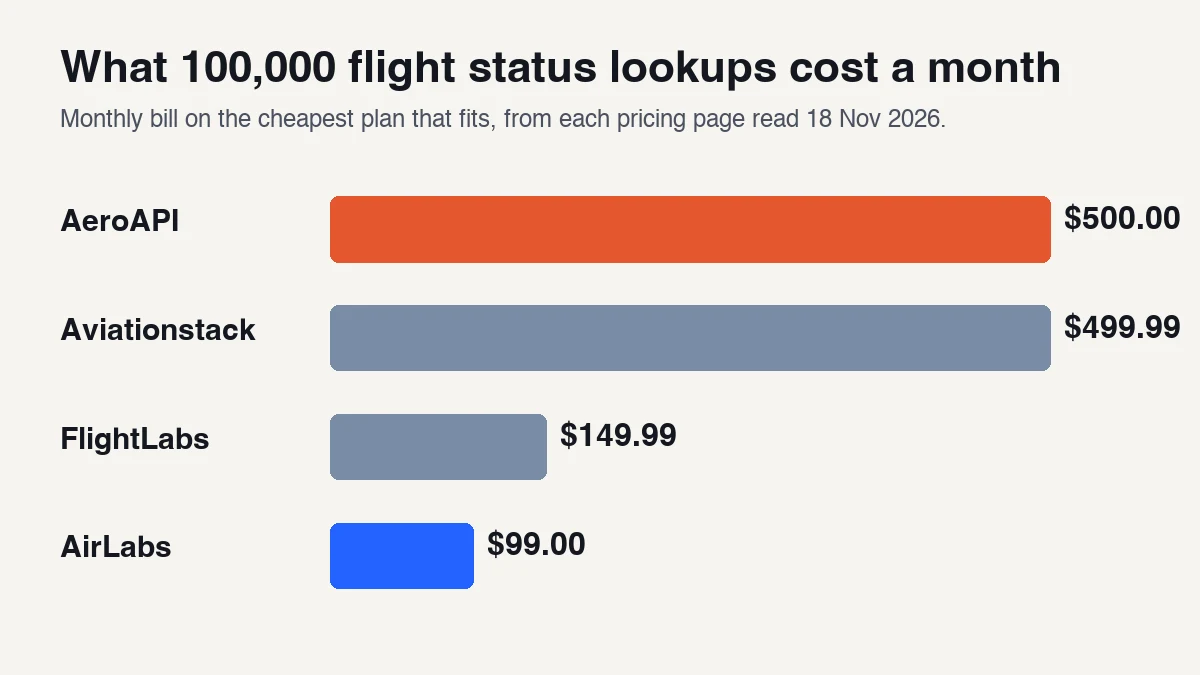
| 100,000 | $499.99 | $500 | $149.99 | $99 |
Three things to notice:
- AeroAPI is a usage product with a floor. A flight lookup is $5 per 1,000 result sets, but the Standard tier has a $100 a month minimum, so 1,000 lookups cost the same as 20,000. It only starts to pay for itself above 20,000 lookups, and by 100,000 it costs $500.
- Aviationstack is flat, then steep. One plan covers 10,000 lookups for $49.99. At 100,000 it makes more sense to jump to the 250,000-request Business plan at $499.99 than to pay overage on a smaller one: Professional plus 50,000 extra requests would cost $749.95 by our arithmetic.
- The cheapest plan on paper is not always the plan you can use. Read the next section before you pick FlightLabs.
The limits that change the real price#
FlightLabs caps "real-time flight results" on small plans. The Starter plan lists 4,000 monthly API calls but only 100 real-time flight results. The Basic plan lists 10,000 calls and 1,000 real-time flight results. From Pro up, the page says unlimited. If your app is mostly live status, the plan that matches your volume may be Pro at $149.99, not the cheap tier.
Free plans are not for products. Aviationstack's free plan is for non-commercial use with 100 requests a month. AirLabs' free plan is for personal use. FlightAware's Personal tier is for personal or academic use. Plan on a paid tier the moment real users see the data.
What you are allowed to store and show. FlightAware lists different rights per tier: Personal covers personal or academic storage, Standard business or business-to-consumer use, and Premium all commercial use including business-to-business. Read the licence of any provider before you cache their data.
Status costs less than tracking, on AeroAPI. Its table lists a flight lookup at $0.005 per result set, a current position at $0.010 and a flight track at $0.012. If you draw planes on a map, budget for more than status.
How to choose#
- Count your lookups. Flights you track times how often you refresh. Refreshing every 10 minutes for 24 hours is 144 lookups per flight a day.
- Cut the count. Poll only flights leaving in the next few hours, and poll less often when nothing is changing.
- Under about 20,000 lookups a month, AeroAPI's $100 minimum is the price to beat. Compare AirLabs, Aviationstack and FlightLabs first.
- Above 100,000, compare the plan pages again, because per-call fees and negotiated enterprise terms matter more than the sticker price.
- Check the commercial licence before you pick a free plan for a launch.
When you need something else#
- Booking tickets: see the flight booking API comparison.
- Searching fares, not status: compare prices in SerpApi Google Flights alternatives.
- Free position data with no key: see free flight data APIs we tested.
- The whole travel stack: best travel APIs for developers.
What we did not test#
- We made no live calls to any of these APIs, so we have no numbers on accuracy, delay detection or response time.
- We did not read Cirium's pricing, which is not listed in our tables.
- We did not check which airports and airlines each provider covers.
- Prices are from public pricing pages on 18 November 2026. Taxes and annual discounts can change what you pay.
Quick checklist#
- I know how many lookups my app makes a month
- I picked a plan that allows commercial use
- I checked for caps on real-time results on the plan I chose
- I know the monthly minimum, if any
- I read the provider's current pricing page, not this one
Related reading#
- Flight Booking API: 10 Famous Options Compared: when you need to issue tickets.
- Free Flight Data API: No-Key Options Tested: position data with no key.
- Best Travel APIs for Developers in 2026: flights, hotels, maps and more.