Most "best APIs for SaaS" lists give you a category and a logo. They rarely tell you what you will pay when the product works, and none of them warned you that one of the names on the list would announce its own shutdown this week.
That happened. On 16 November 2026, Lemon Squeezy told its customers it is closing and will stop processing payments on 31 March 2027. So this guide does two things the lists skip: it prices a real stack at three growth stages, and it shows how to build so that one vendor disappearing is an annoying week, not a crisis.
What "API stack" means here#
When a founder says "the APIs we use", they mean services that someone else runs and you call over the internet: take a card payment, check a password, send an email. You pay for each one, usually by usage. Together they are your SaaS API stack.
The reason to buy rather than build is simple. Each of these jobs is a full-time specialty (payments law, password security, email deliverability) that customers do not pay you extra for doing yourself. Spend your time on the part only your product does. If you are designing your own API as well, our guide to API-first development and API design principles cover that side.
The six layers and what each costs#
All prices below were read from each vendor's own pricing page on 17 November 2026, in US dollars, before tax.
| Layer | Pick | Free allowance | First paid step |
|---|---|---|---|
| Payments | Stripe | None needed; pay per sale | 2.9% + 30¢ per card payment, plus 0.7% of Billing volume for subscriptions |
| Login | Clerk | 50,000 monthly retained users | Pro $25/mo, then $0.02 per extra user |
| Resend | 3,000 emails/mo (100 a day) | Pro $20/mo for 50,000 emails | |
| File storage | Cloudflare R2 | 10 GB stored | $0.015 per GB-month, no download fees |
| Analytics | PostHog | 1M events/mo | Pay as you go above the free tier |
| Errors | Sentry | 5,000 errors/mo, one user | Team $26/mo for 50,000 errors, unlimited users |
1. Payments and subscriptions#
Stripe's standard price is 2.9% + 30¢ per successful domestic card payment, with an extra 1.5% for international cards and 1% if currency conversion is needed. If you want Stripe to manage subscriptions (trials, retries of failed cards, the customer portal), Stripe Billing is 0.7% of Billing volume on pay as you go, with no monthly fee. Stripe also lists a monthly plan from $620 per month on a one-year contract, which only makes sense at higher volume.
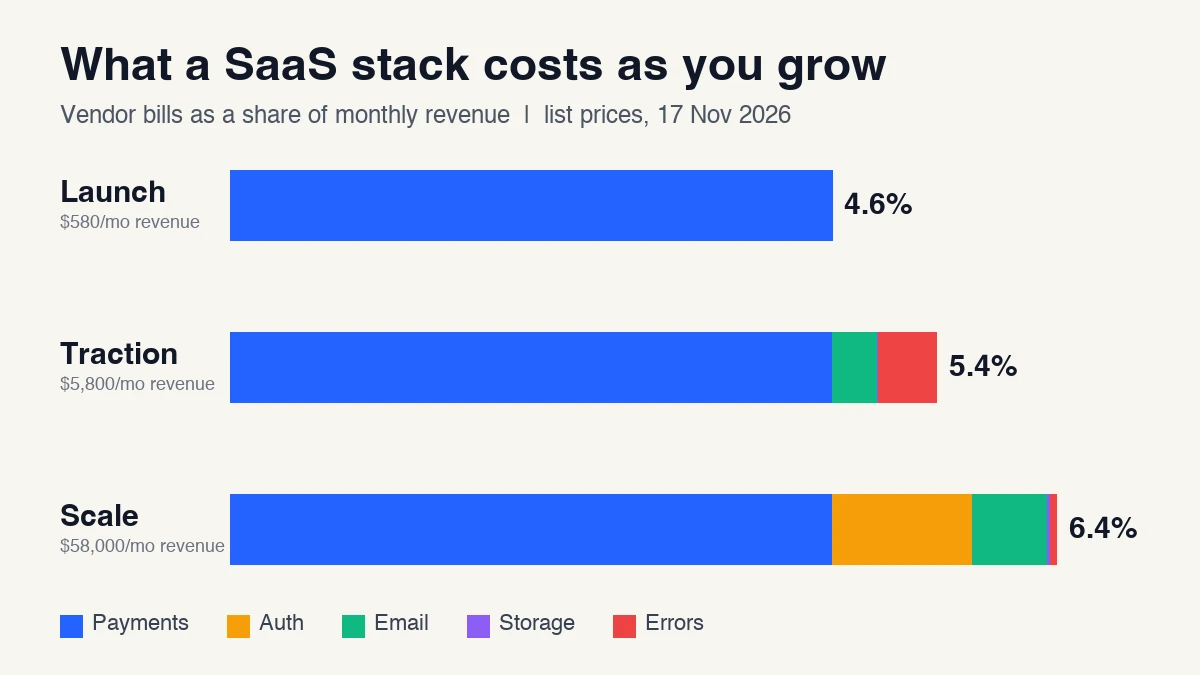
So a $29 plan costs you about $1.34 per payment in total: $0.84 + $0.30 card fees, plus $0.20 Billing. That is the 4.6% line in the chart above. For a head-to-head against PayPal and Square, see our Stripe vs PayPal vs Square API comparison.
The tax question. If you sell worldwide, you owe sales tax or VAT in many places. There are two ways to handle it:
- Stay the seller (Stripe, Clerk Billing). Cheaper per sale. You register for and file taxes, or pay for a tool like Stripe Tax (from $90 per month on its Complete plan).
- Use a merchant of record. The provider becomes the legal seller, collects and files tax and handles chargebacks. Paddle lists 5% + 50¢ per transaction with no monthly fee. Stripe's own version, Managed Payments, lists 3.5% on top of normal payment fees and covers indirect tax in more than 75 countries.
Clerk also offers billing built into its login product at 0.7% of billing volume, on top of Stripe's card fees. It is a shortcut if you already use Clerk, but it is another place your customer data lives, which matters for the lock-in section below.
2. Login and user management#
You need sign-up, sign-in, password reset, social login and, soon enough, two-factor and single sign-on. Three well-known options and what they list:
- Clerk: 50,000 monthly retained users free per app. A "retained" user is one who comes back at least a day after signing up, so people who sign up once and never return are never billed. Pro is $25 per month, then $0.02 for each user above 50,000 (falling to $0.018 above 100,000).
- Auth0: up to 25,000 monthly active users free, including one custom domain (which needs a verified credit card).
- Supabase Auth: 50,000 monthly active users on the free plan; Pro at $25 per month includes 100,000 and then charges $0.00325 per user. The catch: free Supabase projects are paused after a week of inactivity.
One practical note. Clerk bills on retained users and Auth0 and Supabase on active users, so the same audience can cost different amounts. Do the sum for your own sign-up pattern. And if you use a ready-made login screen, check which features need a paid tier: on Clerk, for example, two-factor authentication and removing the "Secured by Clerk" badge are Pro features.
3. Transactional email#
Password resets and receipts must arrive, so this layer is about deliverability more than price. Resend lists 3,000 emails per month free (capped at 100 per day), Pro at $20 for 50,000 emails, and $0.90 per extra 1,000. Postmark lists a free developer plan of 100 emails a month that never expires, then Basic at $15 per month with overages at $1.80 per 1,000 (its Pro plan is $16.50 with overages at $1.30 per 1,000).
The 100-a-day cap on Resend's free tier matters more than the monthly number. A launch-day wave of sign-up confirmations can hit it. Budget the $20 plan from the day you announce publicly.
Two cheap protections are worth adding at sign-up. A validate-email API stops typos and dead mailboxes from damaging your sender reputation, and a disposable-email check keeps throwaway addresses out of your free trial. Both are on the marketplace: Email Validator and Disposable Email Detector.
4. File storage#
For uploads (avatars, exports, attachments), Cloudflare R2 lists $0.015 per GB-month and no charge for data going out to the internet, with 10 GB, 1 million writes and 10 million reads free every month. Amazon S3 is the better-known alternative with a deeper feature list, and it charges for data transfer out; we did not pull its exact rates for this guide, so check its pricing page against your expected downloads. For most early SaaS products, download fees are the surprise line on the bill, which is why R2's zero is attractive. Cloudflare's own example of 1,000 GB stored costs $14.85 a month.
5. Product analytics#
PostHog lists a permanent free tier of 1 million analytics events, 5,000 session recordings, 1 million feature-flag requests and 100,000 error events every month. Over the limit, usage is metered, and you can set a billing limit so you are never surprised. On the free plan, events beyond the limit are dropped rather than billed.
6. Error monitoring#
Sentry's free Developer plan is one user and 5,000 errors per month. The moment a second person needs to see errors you need Team at $26 per month (billed annually; the page says unlimited users and 50,000 errors). Extra errors are metered, starting around $0.0003625 per error between 50,000 and 100,000.
What about the database, SMS and AI?#
- Database and backend: Supabase's Pro plan starts at $25 per month. If you are choosing a database and host, treat it as a separate decision from this stack.
- SMS and voice: Twilio is the usual pick. Skip it until customers ask for text alerts. Clerk's SMS codes cost 1 cent each in the US and Canada on top of the plan.
- AI features: Pick one model API behind one wrapper function. We cover prices and limits in our Claude API guide and the complete OpenAI API guide.
What the stack costs at three stages#
We turned the list prices above into a small calculator and ran three imaginary SaaS products. All three sell one $29 per month plan.
| Stage | Users | Paying | Revenue / mo | Vendor bills / mo | Share of revenue |
|---|---|---|---|---|---|
| Launch | 300 | 20 | $580 | $26.88 | 4.6% |
| Traction | 5,000 | 200 | $5,800 | $315.40 | 5.4% |
| Scale | 80,000 | 2,000 | $58,000 | $3,688.85 | 6.4% |
Where the money goes at Scale: payments $2,688 (Stripe card fees plus Billing), login $625 (Clerk Pro, 30,000 users above the free 50,000 at $0.02), email $335 (Resend Pro plus 350,000 extra emails), errors $26 and storage $14.85 for 1 TB.
Three things stand out:
- Payments are the stack. Card and subscription fees are about 4.6% of revenue at every stage because they scale with sales, while the rest scale with users and mostly stay free for a long time.
- Choosing a merchant of record is a pricing decision. On the same 2,000 payments, Paddle's published rate comes to $3,900 and Stripe Payments plus Managed Payments to $4,312, against $2,688 for Stripe card fees plus Billing. The extra $1,200 to $1,600 a month buys you not doing tax filings. For a solo founder selling globally, that can be a good trade. Run the numbers for your own countries.
- Auth is the first cliff. Clerk's free tier is generous, then $625 appears at 80,000 users. Check your own growth plan before locking in a vendor, because user-based bills grow whether or not those users pay you.
Here is the calculator core, so you can plug in your own numbers (it ran as shown on 17 November 2026):
def stripe_card(charges, price):  return charges * (price * 0.029 + 0.30)
def stripe_billing(volume):       return volume * 0.007
def clerk(mru):                   return 0 if mru <= 50_000 else 25 + (mru - 50_000) * 0.02
def resend(emails):               return 0 if emails <= 3_000 else 20 + max(0, emails - 50_000) / 1000 * 0.90
def r2(gb):                       return max(0, gb - 10) * 0.015

paying, price = 2_000, 29
total = (stripe_card(paying, price) + stripe_billing(paying * price)
         + clerk(80_000) + resend(400_000) + r2(1_000) + 26)   # 26 = Sentry Team
print(round(total, 2))   # 3688.85
How to avoid being locked into one vendor#
The Lemon Squeezy news is the cleanest example of why this matters. A few habits turn a forced migration into a manageable one:
- Own your IDs. Your
usersandsubscriptionstables use your IDs. The vendor's ID (a Stripe customer ID, a Clerk user ID) sits in a separate column. - One door per vendor. All calls to payments, email and login go through one small module. The rest of your code never imports a vendor SDK directly.
- Store the events. Save every webhook you receive from your payment provider (the vendor's notifications about charges and cancellations) in your own table. You then have the history even if the vendor goes.
- Export on a schedule. Do a monthly export of customers and subscriptions. Lemon Squeezy's goodbye post points sellers to an export guide and a migration form; do not wait for that moment to find out how exporting works.
- Read the banner. Before adopting any vendor, open its pricing page and changelog and look for sign-up closures, price changes and sunset notices.
- Keep payment methods portable. Card subscriptions can only be moved between providers with the vendor's help, so ask early what a migration would involve.
A launch checklist#
- Pick one payment provider and decide the tax question (seller or merchant of record) before you write checkout code.
- Use a hosted login product until you have a reason to leave it.
- Send the first email from a verified domain with SPF, DKIM and DMARC set up, and upgrade to a paid email plan before launch day.
- Put uploads in object storage, never on your app server's disk.
- Install analytics and error monitoring on day one, because you cannot get back the first week of data.
- Set billing limits and alerts wherever a vendor offers them (PostHog and Sentry both do).
- Write down, for each vendor, what you would do if it shut down in 90 days.
What this guide is, and is not#
Many roundups on this topic list seven or eight categories with no named providers and no prices. This guide does the opposite: it names the providers, gives the price and shows the sum. The trade-off is that prices change, so check each vendor's page before you commit.
What we did not test#
- We did not build an integration with any vendor, and we did not test the lock-in habits above by migrating a live product. Pricing and limits come from each vendor's pricing page, read on 17 November 2026. We did not make live API calls to them.
- We did not verify deliverability, uptime or speed for any provider. Do not read the list as a quality ranking.
- Several vendors' pages stated figures we did not fully check against a real invoice, for example Clerk's definition of a retained user and Sentry's overage tiers.
- We did not pull Amazon S3's exact transfer-out rates, so we make no numerical comparison with R2.
- The three-stage costs are our own estimates for an imagined product. Your mix of countries, card types, refunds and email volume will change them.
Sources#
Opened and read for this guide: Stripe pricing and Stripe Billing pricing pages, the Stripe subscriptions documentation, Paddle pricing, Lemon Squeezy pricing and its "Saying goodbye to Lemon Squeezy" post (16 November 2026), Clerk pricing, Auth0 pricing, Supabase pricing, Resend pricing, Postmark pricing, Cloudflare R2 pricing documentation, the Amazon S3 pricing page, PostHog pricing, Sentry pricing, API Seeker's "Best APIs for Building SaaS Products", the DEV Community post "10 Must-Use APIs for Your Next SaaS Project" and MacMyths' "7 APIs for SaaS Development".